Welcome to the ultimate guide on the Nature 2 System, the essential sanitation hub for your water circulation system.This video provides crucial insights for maintaining clean and natural pool water. Let's explore the key takeaways and step-by-step instructions:
Guide details
Key Takeaways:
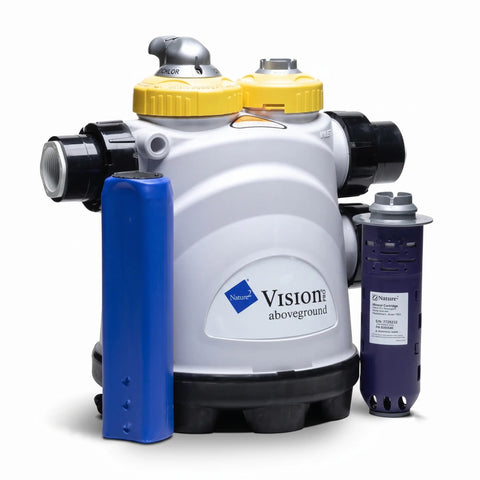
1. Dual-Chamber Functionality: The Nature 2 Unit consists of two chambers—one for chlorine tablets and the other for the Pro Vision sanitizer cartridge. Together, they provide effective sanitation and water clarification.
2. Chlorine Chamber and V-Pack: The chlorine chamber contains specially formulated chlorine tablets, housed in a protective blue sleeve called a V-Pack.
3. Connecting to the Water Circulation System: With the Nature 2 System chambers properly connected to your water circulation system, the Nature 2 system ensures continuous sanitation and water quality.
Step-by-Step Process:
1. Preparing the Chlorine Chamber: Open the chlorine chamber by turning the lid counterclockwise. Insert the blue chlorine V-Pack into the chamber, ensuring the black seal is at the top. Secure the lid by twisting it clockwise. Begin with the chlorine control dial on setting 3, then adjust according to pool use and weather conditions. Regularly monitor the V-Pack levels, particularly after any adjustments.
2. Installing the Sanitizer Cartridge: Open the sanitizer chamber lid by rotating it counterclockwise. Position the Pro Vision sanitizer cartridge inside with the label facing upwards. Close the chamber by tightening the lid clockwise.
3. Finalizing the Connection: With the chlorine and sanitizer chambers prepared, connect the Nature 2 System to your pool's water circulation system for ongoing water purification. Remember to check the system regularly for optimal performance and adjust the settings to match the swimming pool's usage and environmental factors.